



Between getting approved by AdSense and seeing money in your account, there are five stages, and that is where most sites get stuck. It is almost always one simple step left undone: a document not sent, a PIN that never arrived, a payment method not set up.
This guide walks through the whole path, in order. Start with the table "Which stage are you at?" right below: it takes you straight to the step that solves your case. Every rule quoted here comes from the official Google AdSense Help Center, consulted on October 14 and 16, 2026. Google can change deadlines and amounts, so always confirm on the Payments page of your account.
30-second summary
- Approval: without an approved site, nothing happens. If that is you, start with Stage 0.
- Identity: Google can ask for an official photo ID from the start. It takes 5 to 10 minutes and the deadline is 45 days.
- Address PIN: a letter with a 6-digit code, sent when your earnings reach $10. It usually takes 3 weeks.
- Payment method: you can add it once your earnings reach $10 (C$10 in Canadian dollars).
- Payment: a balance of $100 (or C$100) and no holds by the 20th. Google issues the payment between the 21st and 26th of the following month, and the money can take up to 7 business days (EFT) or 15 business days (wire transfer, Canada) to reach your bank.
- Careful: never click your own ads. It is the fastest way to lose the account.
Which stage are you at?
Pick the row that describes your situation today and follow the step shown. If you are unsure, open your AdSense dashboard and check the Payments page, the Verification tab and the "Steps to get paid" list on the home page: Google shows there what is pending.
| Your situation | Stage | What to do now |
|---|---|---|
| My site has not been approved yet or the review is not finished | Stage 0: approval | Check the checklist, connect the site and request a review. It can take from a few days to 4 weeks. |
| I was approved, but my earnings have not reached $10 yet | Stage 1: earnings | Confirm the code is on every page with ads and submit your tax information if the account asks for it. |
| Google asked for my ID | Stage 2: identity | Submit an official photo ID within 45 days. Use your full name, the same as on your bank account. |
| I submitted the document and I am waiting for the PIN letter | Stage 3: PIN | Wait about 3 weeks. After that, request a replacement PIN. |
| I received the PIN letter | Stage 3: PIN | Enter the code in your account as soon as it arrives. Three wrong entries stop your ads. |
| My earnings reached $10 and the account lets me add a payment method | Stage 4: payment method | Add your bank account or another option available in your country. |
| Everything is set up and the balance is below the payment threshold | Stage 5: balance | There is nothing to fix. The amount accumulates month after month and nothing is lost. |
| The balance passed the threshold and the payment did not go out | Hold | Open the alert on the Payments page and resolve it before the 20th of the month. |
| Google says it issued the payment, but the money has not arrived | Arrival | A wire transfer can take up to 15 business days after issue. An EFT, up to 7. |
| My ads stopped showing | Expired deadline or policy | Check whether the identity or PIN deadline expired and whether there is a policy or traffic alert. |
| I already received a payment from Google in the last 6 months | You made it | Talk to GroOne. See the end of this guide. |
The name and address on the payments account must be correct before the PIN is generated. If something is wrong, fix it now: a PIN sent to a wrong address has to be requested again, and the letter takes about 3 weeks.
Stage 0: site approval
Without approval there are no ads, no earnings and no payment. Google asks for four things to accept a site: original, high-quality content, compliance with the program policies, being 18 or older, and access to the site's code. Minors can sign up through a parent or guardian, and the payment goes to that adult.
Before requesting the review, check what blocks sites the most:
- Code in the right place: the AdSense code between the head and /head tags, on the same site you registered. Accepted alternatives: an ads.txt file or site verification in Search Console.
- Accessible site: online, with no password, with Google's crawler not blocked in robots.txt and, if you use HTTPS, with a valid certificate and a redirect from HTTP.
- Enough content and good navigation: pages with useful content and a menu that helps visitors find what they are looking for.
- No policy violations: review the program policies and the Policy center in your account.
Then, in the dashboard, open Sites, click Request review and wait. The review usually takes a few days and can take up to 4 weeks. Google notifies you by email. If you use Blogger or YouTube, you follow a different path: sign-up happens inside Blogger itself or in YouTube Studio.
If the site is not approved, fix what Google flagged, review the whole site and request a new review.
The path to payment: stages 1 to 5
After approval, Google splits the path to the first payment into five stages. The amounts below are for accounts in US dollars. Confirm your account currency on the Payments page: in Canadian dollars, the payment threshold is C$100 and the payment method selection threshold is C$10. Each currency has its own thresholds in Google's official table.
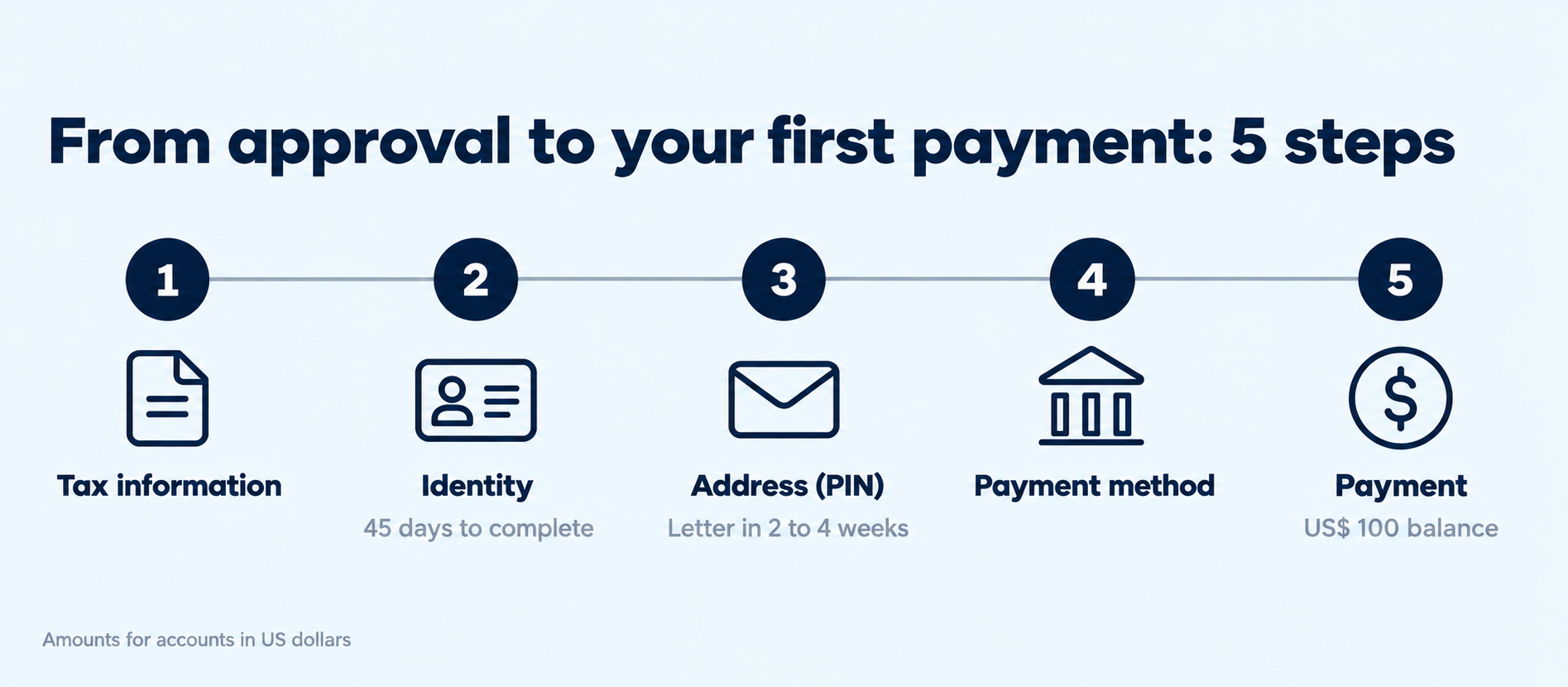
Stage 1: $10 in earnings and tax information
Earnings only start when the ad code is on the pages where you want to show ads. Turning on auto ads is a way to do that without editing page by page. The first milestone is reaching $10.
From your first sign-in, Google may ask for tax information, depending on your country. If the account asks for it, complete the form. Without that data, the payment can be held or face a higher tax withholding. Google does not give tax advice: to know which form to use, talk to your accountant. Data submitted after the 20th only counts for the following month's cycle.
Stage 2: identity verification
Google may ask for identity verification from the start, before you earn anything, so the account can start showing ads and receiving payments. A notice appears in your account when the time comes.
What you need:
- A valid official photo ID.
- Depending on your location, a selfie video. If you prefer, you can skip it and ask for a manual review, which takes 2 to 3 business days.
- 5 to 10 minutes: that is how long it takes most people.
The deadline is 45 days from the first request. If it passes without completing it, account activation is paused.
In the payment details, write your full name exactly as it appears on your bank information, the full mailing address associated with your bank account, with ZIP or postal code, and a valid phone number. The PIN from the next stage arrives at that address, so use a place where you really receive mail.
Stage 3: address PIN
The PIN is the stage that delays people the most. It is a letter with a 6-digit code, sent by mail to the payments address when your earnings reach the verification threshold ($10). If Google asked you to verify your identity, the PIN is only sent after that. In some places, people who already confirmed their identity online may not need the PIN: check Payments, Verification tab. The letter has no tracking and usually takes 3 weeks.
- Before reaching $10: check that name and address are correct and written the way the postal service in your country expects: street number and name, apartment or unit, city, state or province, and ZIP or postal code. With a wrong address, the letter goes to the wrong place.
- You changed address after it was sent: request a replacement PIN 3 weeks after the original send date, so it arrives at the new address.
- The letter arrived: enter the code in your account right away. After three wrong entries, verification fails and ads stop until you request a replacement PIN. Type it carefully, exactly as it is on the letter.
- It did not arrive in 3 weeks: go to Payments, Verification and Resend PIN. The new code is an exact duplicate of the original: use whichever arrives first.
- Final deadline: 4 months from when the PIN is generated. After that, ads stop. To extend the deadline, talk to Google.
Stage 4: payment method
You can only choose the payment method when your earnings reach the payment method selection threshold, which is $10 (C$10 in Canadian dollars). Before that, the option does not appear. The path is Payments, Payment info, Manage payment methods and Add payment method. Depending on the country of your payment address, Google offers different options: wire transfer, electronic funds transfer (EFT), check or PayPal Hyperwallet. The details by country are in the section "How the money arrives in the US and Canada".
Stage 5: minimum balance and Google's calendar
The payment goes out when the balance reaches the payment threshold ($100 in dollar accounts) and the account has no holds. The cycle is monthly, with dates worth writing down:
| When | What happens |
|---|---|
| Day 3 | The previous month's earnings are finalized and added to the balance on the Payments page. |
| Day 20 | Final deadline to resolve holds: tax information, payment method and withholdings. The balance must be at or above the payment threshold. |
| Days 21 to 26 | Google issues the payment. If the 21st falls on a weekend or holiday, the next business day applies. |
| Up to 15 business days later | Time for a wire transfer to reach your bank. An EFT takes up to 7 business days. |
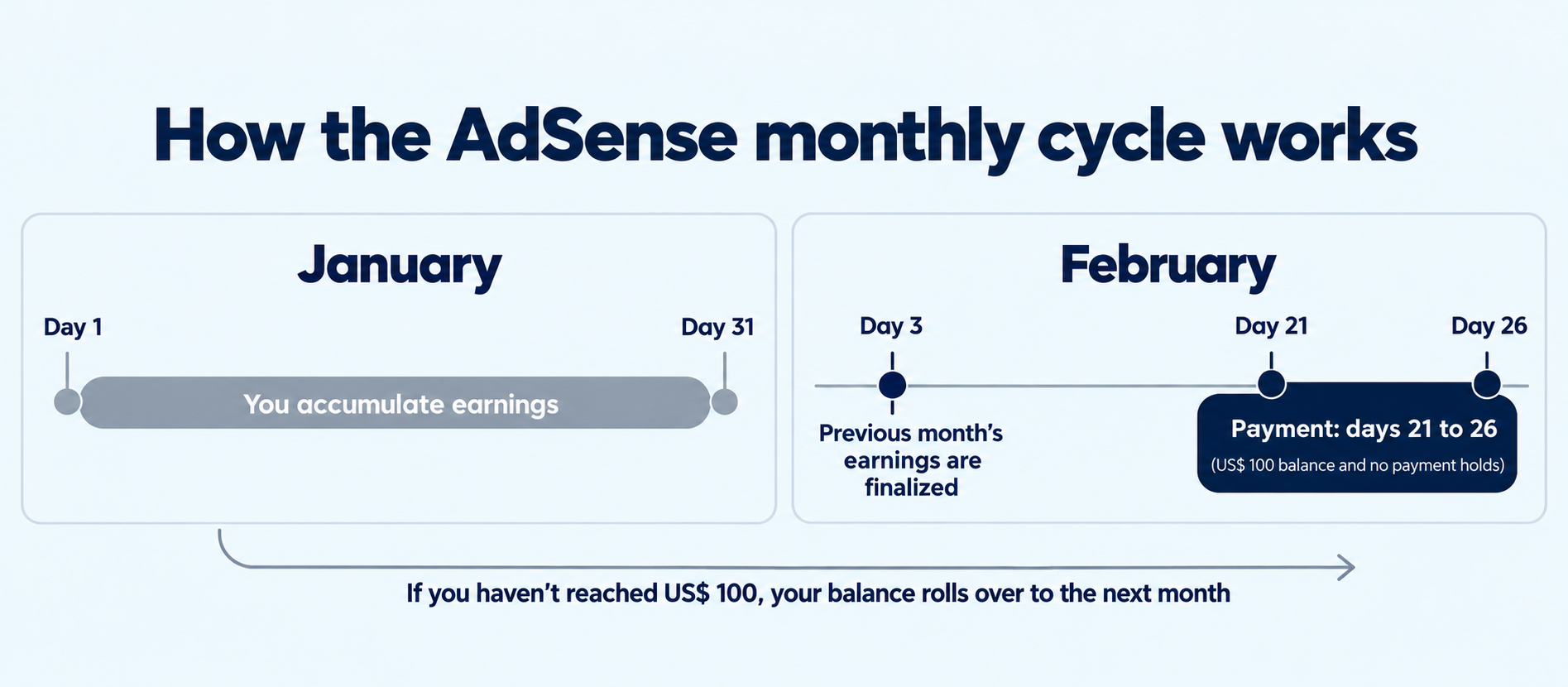
Example: October earnings are finalized on November 3. If on November 20 the balance is at or above the payment threshold with no holds, the payment is issued between November 21 and 26. If a hold is resolved after the 20th, the payment only goes out in the following cycle. If the balance has not reached the threshold yet, it accumulates for the next month and nothing is lost.
If you also get paid through AdSense for YouTube, each payments account has its own thresholds: you verify identity and address only once, but you must reach the payment threshold in each one.
How the money arrives in the US and Canada
The options depend on the country of your payment address. In Google's official table for the United States and Canada, these are the four possible methods:
- Wire transfer: available in Canada, not in the United States. Google initiates the transfer between the 21st and 26th and it can take up to 15 business days to reach your account, depending on your bank. If the currency of your AdSense account differs from that of your bank account, the bank does the conversion, and it may charge its own fees and exchange rate. Compare your bank with a remittance platform before registering the account.
- Electronic funds transfer (EFT): available in the United States and Canada. You receive the payment up to 7 business days after Google issues it.
- Check: not available in the United States or Canada.
- PayPal Hyperwallet: available in the United States, not in Canada. You must create a new Hyperwallet account when you set up this option: one you already have will not work. The earnings are deposited there between the 21st and 26th and from there you choose how to withdraw them. Some withdrawal options have PayPal fees. Save your payee ID and look for the activation email in your spam folder too.
This list follows Google's table consulted on October 16, 2026. If Google changes the options, check the official table in the "Official sources" section.
Why the final amount can be lower than the estimate
During the month, the dashboard shows estimated earnings. At the start of the following month, Google calculates the final amount, which can be lower. One cause is invalid clicks that are discarded. So count on the final amount, not the estimate.
How long until the first payment?
It depends on your traffic, and Google does not set a timeframe. The payment goes out in the cycle after the month when the balance reaches the threshold and all stages are complete. What you control is not leaving any stage pending when the balance gets there.
Holds, errors that cause delays and invalid traffic
When a payment is held, the reason appears as an alert on the Payments page. Click the alert: it tells you what to do. The most common reasons, according to Google:
- Tax information not submitted: in countries where Google requires it, the payment only goes out after submission.
- Identity not verified: remember the 45-day deadline.
- Address not verified: the PIN was not entered or did not arrive.
- Payment method not set up: without it, the balance stays stopped even if it exceeds the payment threshold.
- Hold turned on by you: if you paused payments, you must remove the self-hold.
- Google request to confirm your details: the payments team may ask for personal information. Follow the steps in the alert in Google's payments center.
- Account under policy or traffic review: the payment is held and released automatically if the account is in good standing. In that case, there is nothing to do.
During site approval, what delays things most is code outside the right place, the site being offline or password-protected, Google's crawler blocked in robots.txt, and thin or copied content.
The mistake that can close the account: invalid traffic
For Google, invalid traffic is any click or impression that artificially increases the advertiser's cost or the publisher's earnings, on purpose or by accident. If Google detects a lot of invalid traffic, it can suspend or close the account. The most cited reasons:
- Clicking your own ads, even out of curiosity or to test them. To see who the advertiser is, type the ad's address directly into the browser.
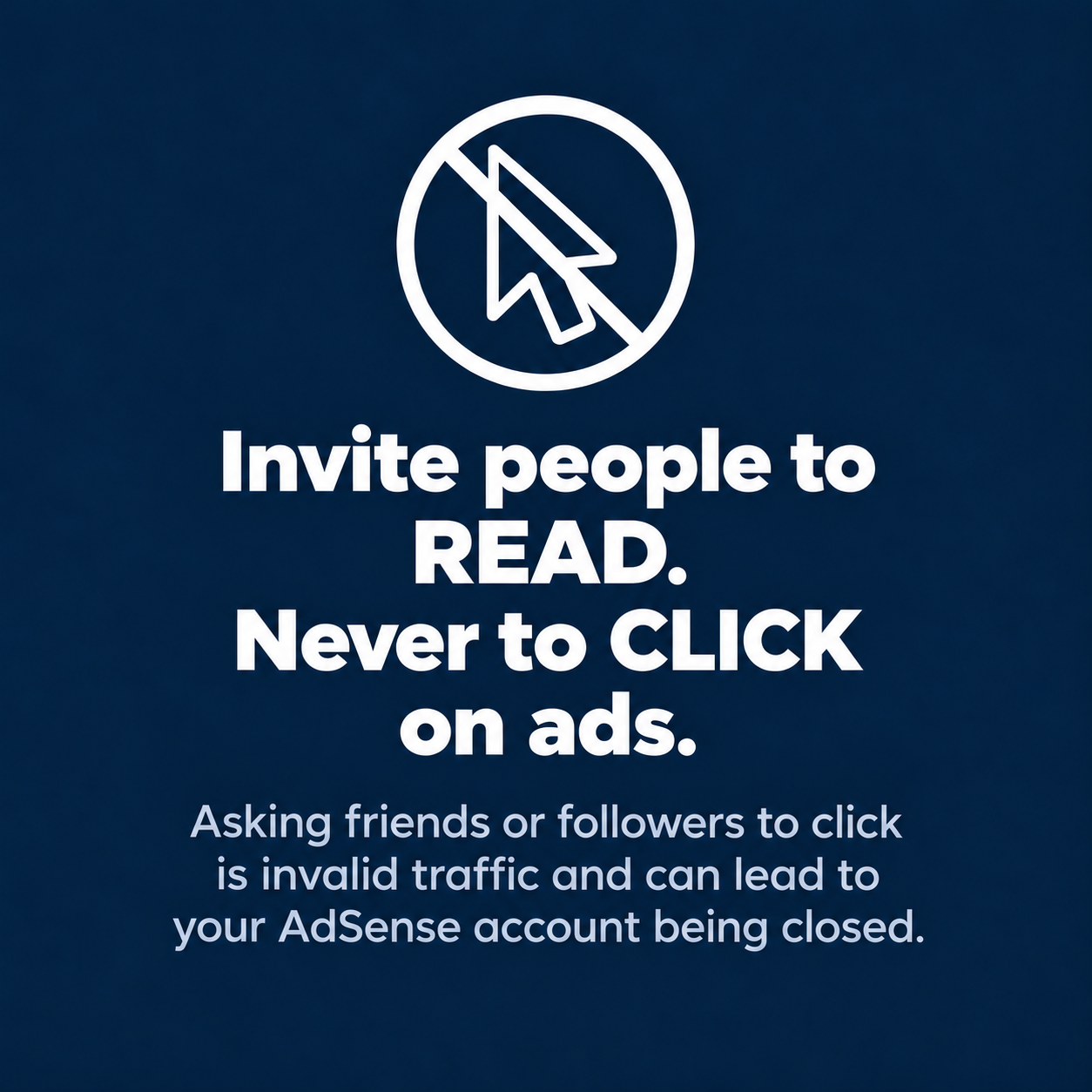
- Asking friends, family or followers for clicks, even as a way to "support the site".
- Offering rewards to people who view or click ads, or using text that encourages clicking.
- Using automatic click tools, bots or purchased traffic.
- Placing ads so they are mistaken for menus or sit right next to buttons, causing accidental clicks.
The responsibility is yours even if the problem comes from third parties. Check where visits come from before accepting traffic from any source. If you promote the site on social media, the practical rule is simple: invite people to read the content, never to click the ads.
Policy violations can also lead to ads being disabled. See the most common ones in Why Sites Get Banned from Google: 5 Mistakes That Can Destroy Your Monetization.
When to Talk to GroOne
Talk to GroOne when your AdSense is active and you have already received a payment from Google in the last 6 months. That history shows the site is in good standing and ready to grow beyond basic monetization.
GroOne works with publishers in Brazil, Latin America and North America, with proprietary technology, data analysis and specialized support. With your history in hand, our team evaluates the site and shows you what can be done.
Have you received a payment from Google in the last 6 months? Talk to Tatiane on WhatsApp.
Not there yet? Use this guide as a checklist, stage by stage, and save the link. Follow GroOne on Instagram, Facebook and LinkedIn for new monetization tips. When your first payment lands, come back and talk to us.
Did you get your first payment after following the guide? Tell us in the form below. Our team will check your record and get in touch.
Read also
- Why Sites Get Banned from Google: 5 Mistakes That Can Destroy Your Monetization
- Google Ad Manager vs AdSense
- Original, high-value content
Official Sources
Consulted between October 14 and 16, 2026. Google's information changes often; when in doubt, what the AdSense Help Center says prevails.
- Eligibility requirements for AdSense
- Age requirement for an AdSense account
- What to do when your site is not ready to show ads
- Complete your AdSense account setup
- Steps to getting paid
- Payment thresholds
- Payment timelines for AdSense
- Address verification (PIN) overview
- Fix problems with AdSense address verification (PIN)
- Add your payment method for AdSense or AdSense for YouTube
- Receive your payments via PayPal Hyperwallet
- Submit your non-US tax info to Google
- Common AdSense payment hold issues
- Invalid traffic
- Top invalid traffic and policy violations that lead to account closure